
Generate bulk barcodes from Excel or CSV data
A bulk barcode generator turns a list of values into many barcode images at once. It is useful when you already have SKU numbers, inventory IDs, serial numbers, or product label data in Excel or a CSV file and need the matching barcode files without generating each one manually.
The page uses Code 128 by default because it is a common format for inventory labels, warehouse codes, product IDs, and internal logistics workflows. You can switch formats when your batch needs EAN, UPC, QR Code, Data Matrix, PDF417, ITF, Codabar, or another barcode type.
How to generate barcodes in bulk
The screenshots below show the actual bulk barcode workflow: add your source data, review the generated Code 128 barcode list, then download or print the output in the format your label process needs.
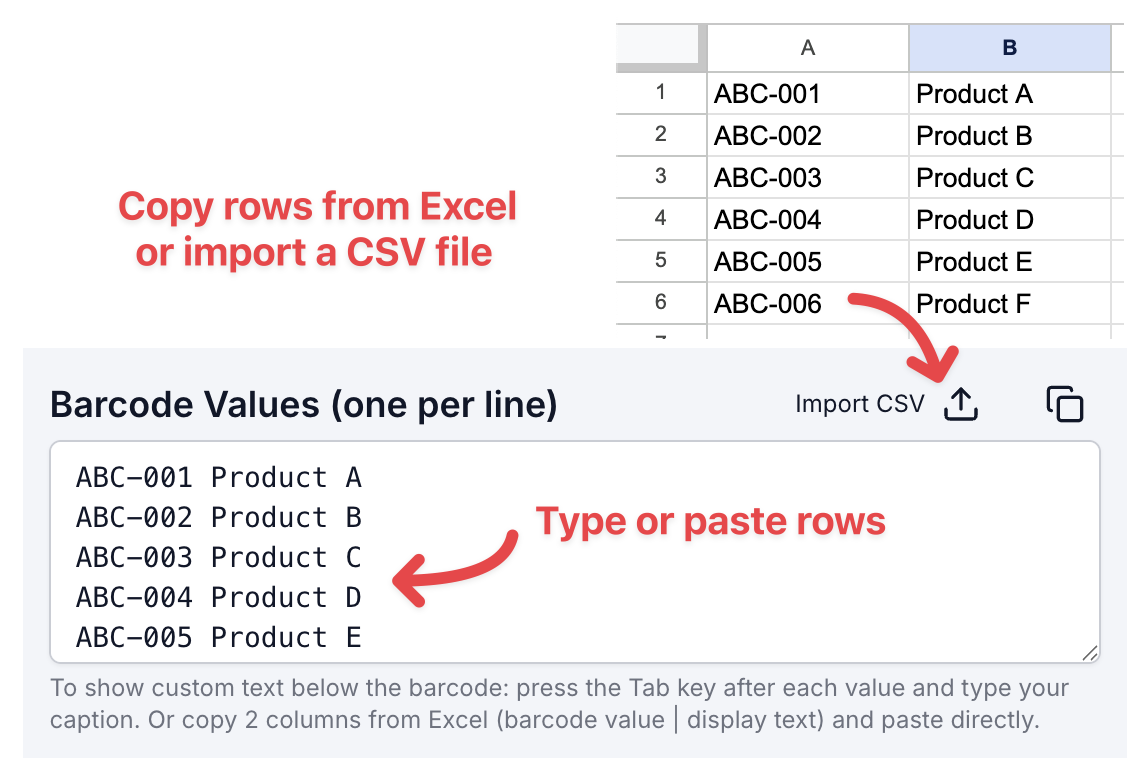
1. Choose your input method
Type values manually, paste rows from Excel, or import a CSV file. When you paste two columns, the first column becomes the barcode value and the second column becomes the display text under the barcode.
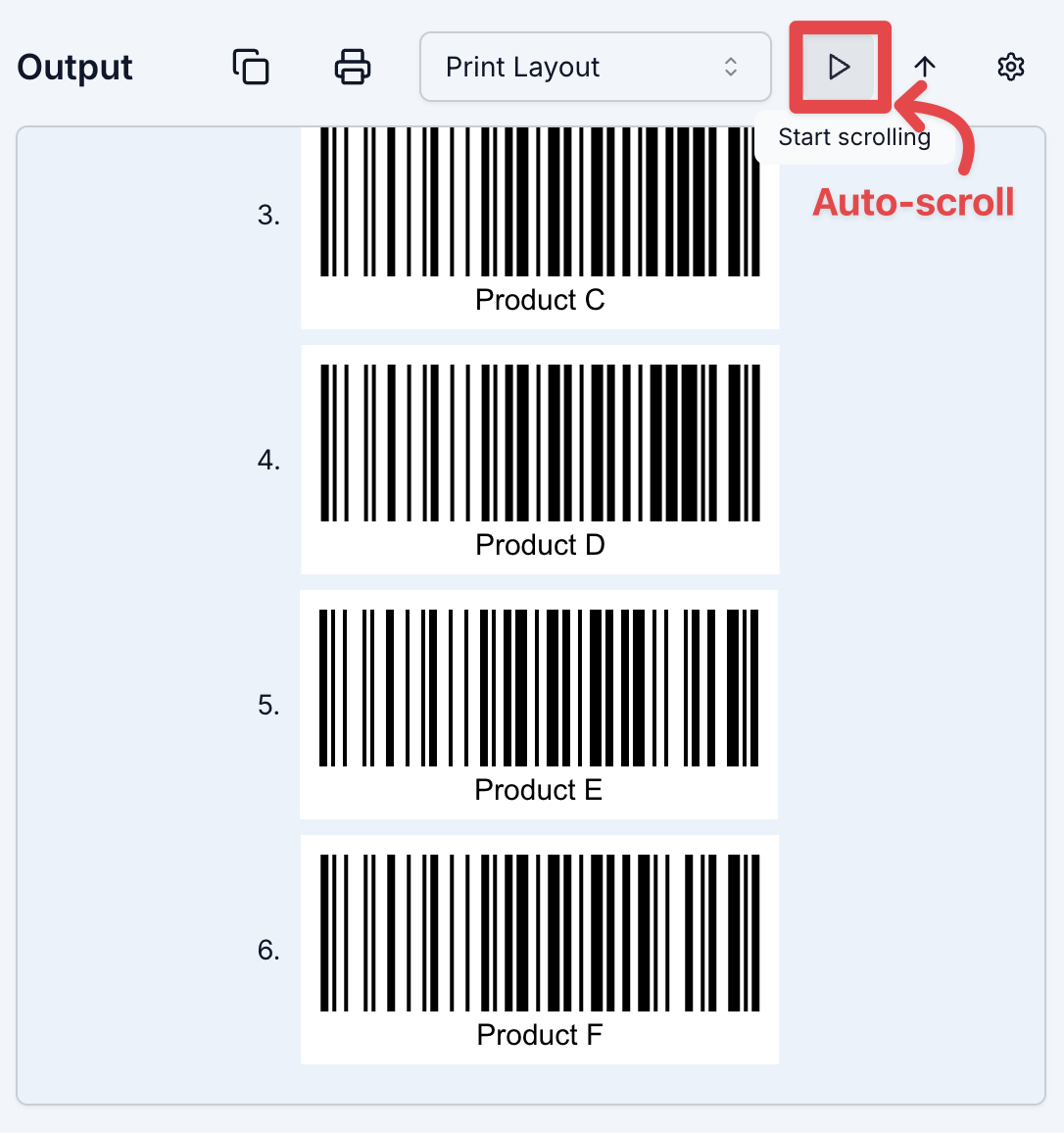
2. Preview and auto-scroll the batch
Each row creates one barcode in the output list. Use the preview area to review the batch, and use auto-scroll when the generated list is longer than the visible output panel.
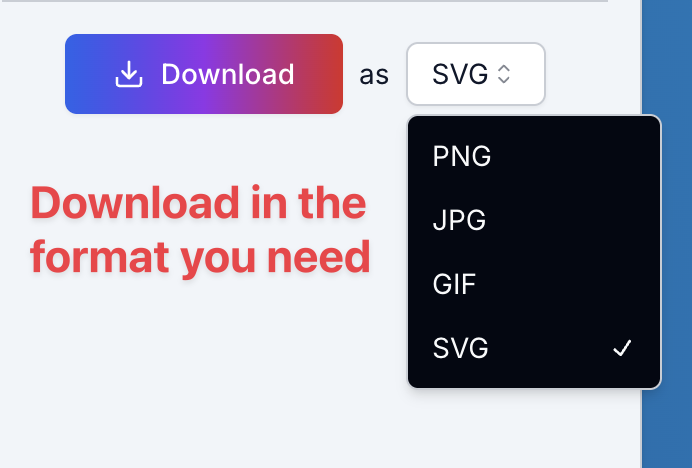
3. Download in the format you need
Choose PNG, JPG, GIF, or SVG before downloading. When multiple barcodes are generated, the batch can be saved together as a ZIP file.
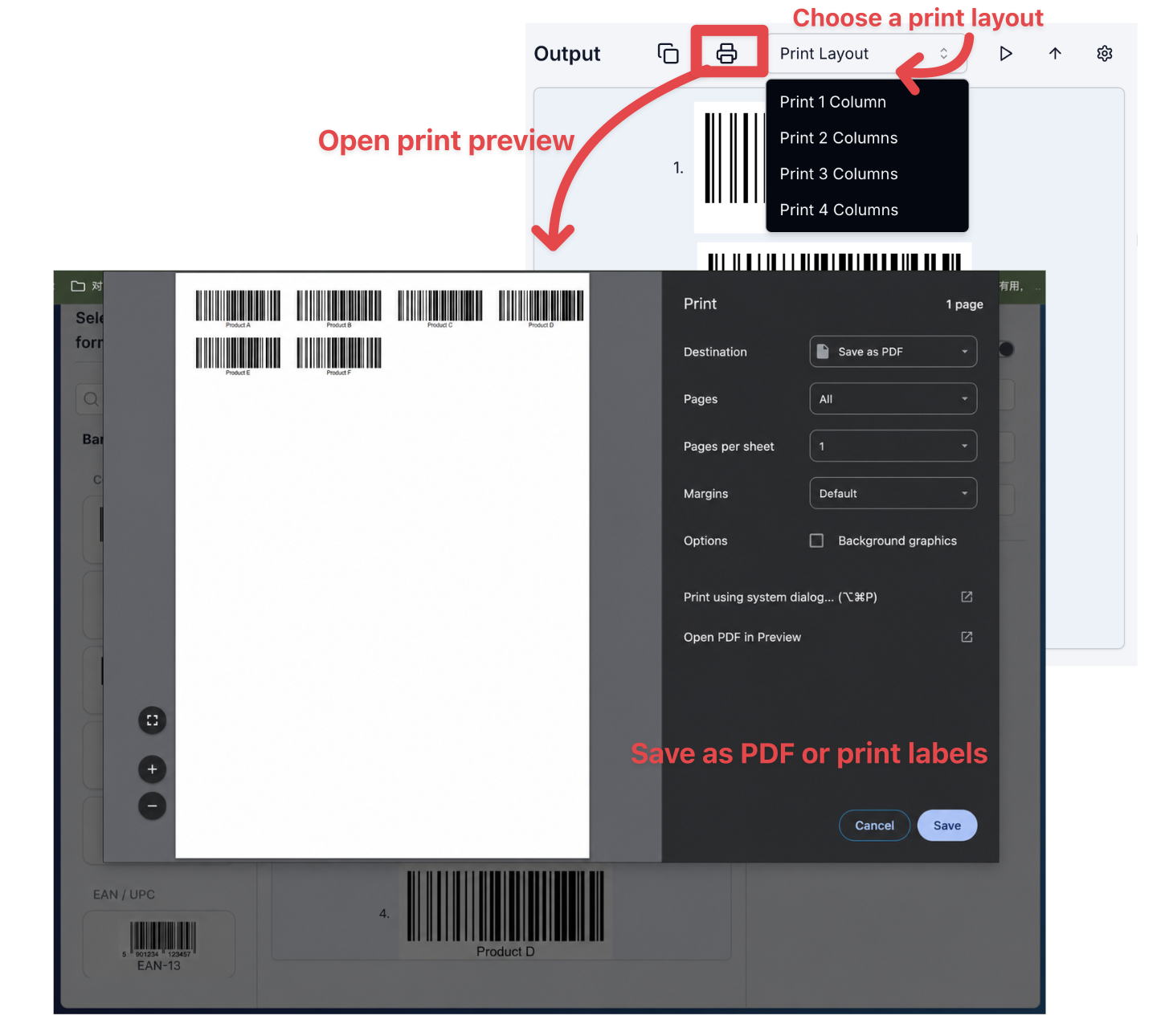
4. Prepare barcodes for printing
Switch to a print layout, open the print preview, and save the arranged barcode labels as a PDF or print them for label sheets.
What this bulk barcode generator supports
- Spreadsheet-friendly input: paste rows from Excel or import CSV data when product codes are already stored in a sheet.
- Batch barcode preview: generate multiple barcodes from one list and review them in order before downloading.
- Bulk label output: export individual images or a ZIP file for label printing and handoff.
- Code 128 default: start with a practical barcode format for inventory, logistics, and internal product labels.
Bulk barcode download formats
Different label workflows need different output formats. Use SVG when print quality matters, PNG for quick image exports, or ZIP when you are downloading a multi-row barcode batch.
- SVG: best for crisp print workflows, label design tools, and scalable artwork.
- PNG: useful for quick exports, internal documents, and simple label previews.
- JPG and GIF: convenient when your downstream system expects common image formats.
- ZIP: used for multi-row barcode batches so the whole set downloads together.
Privacy and local processing
Barcode previews and image exports are generated client-side in your browser. You can paste values, preview the batch, and download files without creating an account.
Common bulk barcode use cases
Use the generator when you already have a list of codes and need the matching barcodes created in one batch.
- Inventory barcode labels
- Warehouse bin and shelf codes
- Product SKU and serial number labels
- Shipping and fulfillment batches
- Retail back-office label printing
- Asset tags for equipment tracking
Bulk barcode generator vs. other workflows
Bulk barcode generator
Best when you need multiple image files from an existing list of SKU, inventory, or serial values.
Single barcode generator
Better when you only need one code, want to test one value, or need a quick shareable barcode.
Excel barcode fonts
Useful inside a spreadsheet, but easier to misconfigure and less convenient for ZIP image exports.
Related barcode tools
If your batch does not use Code 128, switch to a related generator and keep the same barcode creation workflow.
- Free Online Barcode Generator: Create single barcodes across UPC, EAN, QR, Code 128, and more.
- Code 128 Generator: Generate standard Code 128 barcodes for inventory and logistics.
- EAN-13 Generator: Create EAN-13 product barcodes for retail packaging.
- QR Code Generator: Generate QR codes for URLs, text, and business workflows.
Bulk Barcode Generator FAQ
What is a bulk barcode generator?
A bulk barcode generator creates many barcodes from one input list. Instead of generating one barcode at a time, you paste multiple values or import CSV data, then the tool creates a matching barcode for every row.
Can I import CSV data for bulk barcode generation?
Yes. You can import CSV data or paste rows from Excel. The tool treats each row as a separate barcode item, which makes it useful for product lists, SKU tables, and inventory exports.
Can I generate bulk barcodes from Excel rows?
Yes. Paste one Excel column when you only need barcode values, or paste multiple rows when your list includes display text. This bulk barcode generator is designed for spreadsheet-based label workflows.
Can I download all generated barcodes as a ZIP file?
Yes. After generating the barcode list, you can download individual barcode files or export the batch as a ZIP file. ZIP export is useful when you need many labels for printing or handoff.
Which file formats does this bulk barcode generator support?
The generator supports PNG, JPG, GIF, SVG, and ZIP downloads. SVG is a good choice for crisp printed labels, while PNG and JPG are convenient for quick exports.
Is my barcode data uploaded to your server?
Barcode previews and image exports are generated in your browser. This makes the tool practical for internal SKU lists, inventory IDs, and other batch label data that you want to process quickly.
Is this only for Code 128 bulk barcodes?
This page uses Code 128 by default because it is common for inventory, logistics, and internal product labels. You can switch to other barcode formats when you need EAN, UPC, QR Code, Data Matrix, PDF417, ITF, or Codabar.